
Set the exchange pair
Select Kyber Network (KNC) in the “You send” field and Ocean Protocol (OCEAN) in the “You get” field, then enter the amount you want to swap. The form now shows how much OCEAN you receive at the current rate.
 1 KNC =$1.01129981-1.89%
Changelly lets you exchange KNC to OCEAN in 3 clicks, with wallet delivery in as little as 10 minutes. Enjoy fast swaps and low fees!
Select Kyber Network (KNC) in the “You send” field and Ocean Protocol (OCEAN) in the “You get” field, then enter the amount you want to swap. The form now shows how much OCEAN you receive at the current rate.

Pick Floating if you want the rate to follow the market, or Fixed if you want the OCEAN amount locked when you create the order. A floating rate can shift before your KNC confirms, while a fixed rate holds only for a limited time, so check the latest quote before you confirm.

Paste your OCEAN wallet address into the recipient field. Crypto transfers can't be reversed, so a wrong address means lost funds. Confirm the address belongs to the Ocean Protocol network before you continue.

Finalize your KNC to OCEAN exchange: create the order and send the exact KNC amount to the deposit address shown on-screen. Once the Kyber Network network confirms your deposit, you will receive OCEAN to your wallet.
The current KNC to OCEAN exchange rate is 1 KNC = 1.00226914 OCEAN. The conversion rate changed by -1.89% over the past 24 hours and 0% over 7 days, while the 30-day change is 6.72%.

years on the market
support team
millions users

Changelly Partners With Revolut to Expand Crypto Access in Europe

Changelly Expands Services With Zero-Fee Valentine’s Promotion

Changelly Reaches 10 Million Users and Marks 10 Years in Crypto

Changelly Review 2025: Is It Legit and Trusted by Millions?

Changelly Exchange Review: Features, Fees, and Safety

Changelly Black Friday Offer: Reduced Fees and iPhone Giveaway
Get better rates in the app and enjoy an exclusive discount on your very first crypto exchange transaction. Don’t settle for less when you can maximize your returns with us!
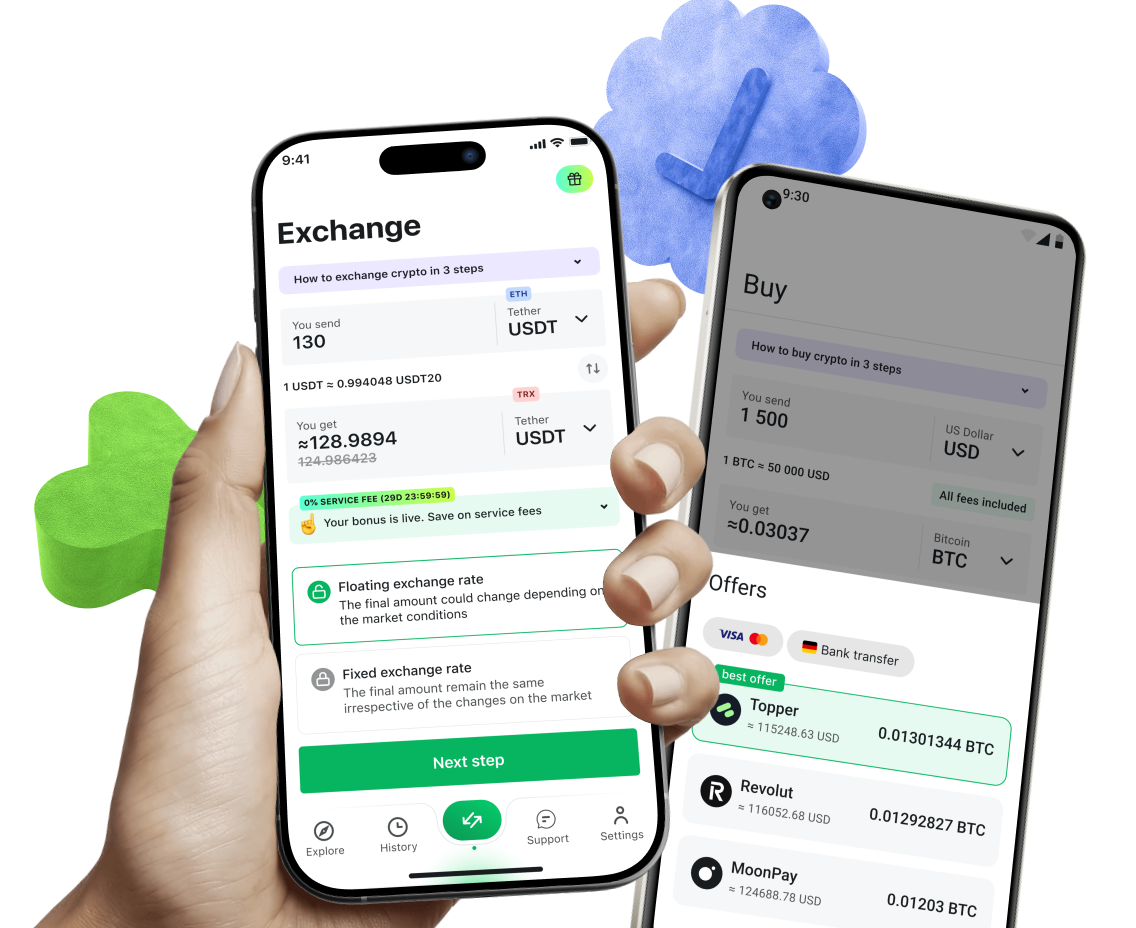
Changelly is a non-custodial crypto exchange, so you stay in full control of your funds throughout the process.
A typical KNC to OCEAN swap on Changelly takes 5–10 minutes, which keeps the window for rate changes short.
Convert KNC to OCEAN with low commissions and get more from every trade. Changelly shows you the fees before you confirm the swap, with no hidden costs.
Changelly doesn't store your funds, and your private keys stay with you. Your Ocean Protocol goes straight to your wallet after the KNC swap.
OKB to OCEANADA to OCEANRENDER to OCEANTWT to OCEANTRX to OCEANUSDCSOL to OCEANAPE to OCEANUSDT20 to OCEANXMR to OCEANLTC to OCEANAGIX to OCEANETH to OCEANBTC to OCEANLINK to OCEANNOIA to OCEANXLM to OCEANWAVES to OCEANRNDR to OCEANVET to OCEANUSDC to OCEANUSDTRX to OCEANKNC to OCEANSUSHI to OCEANCRV to OCEANXRP to OCEANEGLD to OCEANUNI to OCEANBTT to OCEANAVAXC to OCEANIMX to OCEANSOL to OCEANBuy ABYSSBuy AEBuy ARNBuy ASPBuy BALBuy BIFIBuy BNBBuy BTCBuy CELBuy DOGEBuy EDGBuy ETHBuy ETHBASEBuy ETNBuy FRONTBuy ILVBuy IOSTBuy ISLMBuy LITENTRYBuy LTCBuy MAIDBuy MDTBuy OMBuy ONGBuy OPBuy PYTHBuy QTUMBuy RLCBuy SAHARABuy SNTBuy SOLBuy TONBuy TRXBuy UNFIBuy USDCBuy USDTBuy USDTRXBuy VETBuy VGXBuy XDCBuy XMRBuy XRPBuy YGGBuy ZECBuy ZIGThe KNC to OCEAN exchange rate is the amount of Ocean Protocol (OCEAN) you receive for each Kyber Network (KNC) you swap. The rate changes constantly because it follows market demand, price trends, and liquidity, meaning how easily you can convert KNC for OCEAN at that moment. Changelly displays the live rate on screen, so check the OCEAN amount right before you confirm.
Swapping KNC to OCEAN on Changelly includes two fees: a blockchain network fee and a small service fee. The network fee pays the miners who process your transaction, so it rises when the blockchain is congested. Changelly shows all fees before you confirm the swap, which means you see the final OCEAN amount upfront.
The minimum amount to exchange KNC to OCEAN depends on the current conversion rate and network fees. Changelly's calculator uses live market data to compute the exact minimum in real time and shows it before you confirm. Check that figure on screen before you send your Kyber Network (KNC).
No, Changelly doesn't require ID verification for KNC to OCEAN swaps. The exception is a transaction that Changelly's system flags as risky, and in that case you'll need to verify your identity. Flags are uncommon, and the check exists to keep the platform secure for every user.